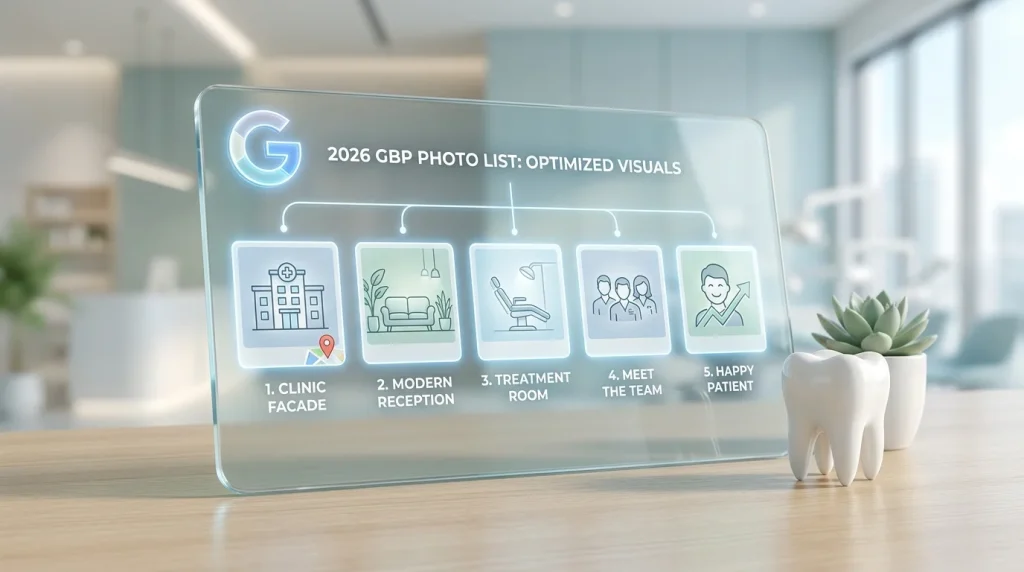
A cosmetic dental practice in Atlanta had a GBP photo set that any marketing consultant would have approved on first glance. Professional photography. Good lighting. Clean operatories. The problem was what was missing: no exterior shot showing the building entrance, no team headshots, no equipment photos. Every image showed a room. None of them showed any practice.
The profile was converting at roughly half the rate of a competitor two miles away, whose photos were taken on an iPhone but included every category Google’s classification system looks for.
Photo quality matters. Photo type matters more.
The best photos for a dental Google Business Profile aren’t the most beautiful ones; they’re the ones that collectively tell Google your practice is legitimate, operational, and worth surfacing, while telling patients your practice is professional, approachable, and worth booking. Those two audiences have different needs from the same image set, and the practices that rank and convert understand how to serve both simultaneously.
According to Sterling Sky’s GBP research, photo completeness across multiple categories is a stronger local pack signal than high volume within a single category (Source: Sterling Sky GBP Research, 2023). A profile with two exterior photos, two interior photos, two treatment room photos, and four team headshots outperforms a profile with twenty treatment room photos and nothing else, regardless of image quality.
This guide gives you the complete 2026 breakdown of photo types for dental GBP profiles: what each type does for your ranking signal, what it does for patient conversion, and exactly what to shoot for each category.
Table of Contents
Why photo type diversity outperforms photo volume in a single category
Google’s photo classification system assigns every image you upload to one of several content categories: exterior, interior, at work, team, product, or identity (logo and cover). Each category feeds a distinct dimension of Google’s profile confidence model.
A profile that populates only one or two categories, even with dozens of high-quality images, creates an incomplete signal. Google interprets a profile with twenty interior photos and no exterior as a business that may not have a publicly accessible physical location. A profile with excellent facility photos and no team photos signals a business that may not have identifiable staff, a trust gap that matters specifically in healthcare categories where patients are choosing a provider, not just a location.
Category diversity is the structural goal. Within each category, quality and recency determine which images Google surfaces first. But no amount of quality within one category compensates for the absence of another.
How patients use different photo types in their decision process
Patients evaluating dental practices before booking move through a predictable decision sequence. Understanding that sequence clarifies why each photo type carries the weight it does.
The first question is location confirmation. Can I find this place, park, and get inside without confusion? Exterior photos answer this. Practices without them create navigational uncertainty that produces same-day cancellations from patients who couldn’t identify the building.
The second question is environment assessment. Will I feel comfortable there? Interior, reception, and waiting area photos answer this. For patients with dental anxiety estimated at 36% of the US adult population (Source: Dental Economics, 2023), this question carries outsized weight in the booking decision.
The third question is provider evaluation. Who will be treating me? Team and provider photos answer this. Patients book with people. A practice where no provider is visually identifiable before the first visit creates an impersonal dynamic that favors competitors with identifiable teams.
The fourth question is clinical credibility. Is this practice modern and well-equipped? Treatment room and equipment photos answer this. For higher-value procedures, implants, and full-arch restoration, patients actively assess clinical technology before committing to a consultation.
Each photo type in the list below serves one or more of these four decision stages. The practices with the strongest photo-driven conversion rates are those that address all four stages in their image set.
The complete list of the best photos for a dental Google Business Profile
Exterior photos
What they do for ranking: Exterior photos are the primary location verification signal in your photo set. Google’s classification system weights them heavily because they confirm that a physical, publicly accessible business exists at the listed address. A profile without exterior photos lacks the most direct visual confirmation of its own existence.
What they do for conversion: Navigational confidence. Patients searching for a dentist in an unfamiliar area use exterior photos to pre-identify the building before their first visit. The absence of an exterior photo is a friction point that produces last-minute no-shows from patients who couldn’t find the entrance.
What to shoot: Your building from the street, wide enough to show the signage and surrounding context. Your parking area or patient entrance clearly shows how to access the practice. If your practice is in a shared building, include a photo of the directory or the specific suite entrance. Shoot in daylight, clear conditions. Two to three exterior photos are the target.
Reception and waiting area photos
What they do for ranking: Interior photos confirm that the business has a patient-facing space, a clinical environment distinct from a home office or virtual address. In Google’s local business verification logic, interior photos are corroborating evidence of legitimate operation.
What they do for conversion: Environment pre-assessment. A patient with dental anxiety deciding between two equally reviewed practices will choose the one whose waiting area looks calmer, cleaner, and more modern. Your reception photos are the first interior impression you make, and first impressions in healthcare settings have a documented effect on patient anxiety levels before the appointment begins.
What to shoot: The reception desk from the patient’s perspective, the angle they see when they walk in. The waiting area shows seating, lighting, and general environment. Avoid shooting during busy periods when the space looks crowded. Two to three photos, well-lit, current, and free of anything that dates the image.
Treatment room photos
What they do for ranking: Treatment room photos populate the “at work” or “interior” category in Google’s classification system. They reinforce the clinical legitimacy signals that health-category businesses need to maintain profile confidence scores in competitive local markets.
What they do for conversion: Clinical credibility and anxiety reduction simultaneously. A patient considering a first visit is forming expectations about the clinical environment before they arrive. A modern, clean, well-lit operatory photo reduces anticipatory anxiety and sets accurate expectations, both of which reduce cancellation rates.
What to shoot: Your primary operatory, shot from the doorway or the patient chair perspective. Modern equipment should be visible and in focus, including digital X-ray sensors, an intraoral camera, updated chair. The room should look clinically ready: clean surfaces, organized instrument storage, and good lighting. Avoid visible waste containers, used instruments, or anything that reads as post-procedure. One to two photos per operatory, maximum two operatories represented.
Team and provider photos
What they do for ranking: Team photos populate the dedicated team category in Google’s classification system, a category that health and professional service businesses are specifically expected to fill. An empty team category on a dental profile creates a signal gap that competitors with populated team photos don’t have.
What they do for conversion: Provider identification and trust formation. Patients choosing a dentist are choosing a person who will work inside their mouth. The decision has a physical intimacy dimension that most other service purchases don’t and that dimension makes provider visibility before the first visit a meaningful conversion factor.
What to shoot: A team group photo all providers and key clinical staff together, in the practice or in front of the practice exterior. Individual headshots for every provider: consistent background, professional attire, direct eye contact, natural expression. Shoot headshots on the same day to ensure visual consistency. One group photo plus one individual headshot per provider is the minimum.
Equipment and technology photos
What they do for ranking: Equipment photos expand your photo set into the “product” or “at work” category and reinforce the service-level signals your GBP services list is already sending. A practice that lists CBCT-guided implant placement in its services and has a photo of its CBCT machine creates signal consistency between its structured data and its visual content.
What they do for conversion: Clinical modernity signaling for high-value procedure patients. Patients considering implants, full-arch restoration, Invisalign, or other high-investment procedures actively assess the technology available at a practice before committing to a consultation. An equipment photo communicates clinical investment without requiring a word of explanation.
What to shoot: Your highest-value or most differentiating technology first: CBCT scanner, digital impression system, intraoral scanner, whitening, or laser equipment. One photo per piece of equipment is sufficient. Three to five equipment photos are a reasonable target for a well-equipped general or specialty practice.
Before and after clinical photos
What they do for ranking: Before and after photos populate the “product” category and add a service-result dimension to your visual content, a signal type that cosmetic and implant-focused practices benefit from specifically.
What they do for conversion: Proof of outcome. For elective and high-value procedures, veneers, whitening, Invisalign, implants, and full-mouth reconstruction, before and after photos are the single most effective conversion asset a dental practice can display. Patients evaluating these treatments are attempting to visualize their own potential outcome. A practice that provides visual evidence of results shortens the decision cycle significantly.
Critical compliance note: Before and after photos of patients require explicit written informed consent for use in marketing materials, including GBP. This is both a HIPAA compliance requirement and a Google guideline requirement. Document consent before the image goes anywhere.
What to shoot: Consistent lighting, angle, and focal length for both the before and after image of the same case. Neutral background. Clinical framing close enough to show the teeth clearly. Three to five case pairs are a strong starting set for a cosmetic or implant practice.
Neighborhood and community context photos
What they do for ranking: Neighborhood context photos are an underused geographic signal reinforcement tool. A photo that places your practice in a recognizable local context adds a geographic layer that complements your NAP signals and geotagged images.
What they do for conversion: Community belonging signals. Patients choosing a local dentist are often making a community affiliation choice as well as a clinical one. They want a practice that is part of their neighborhood, not a faceless corporate location.
What to shoot: Your building in the context of its street or block. Your practice’s participation in local health fairs, school dental programs, or community sponsorships if these are part of your model. One to two photos in this category are sufficient.
Photo type priorities by practice type
General and family practice
Priority order: exterior, reception, team, treatment room, equipment, before and after (if applicable), neighborhood context. Team photos and reception photos carry the most conversion weight for this practice type.
Cosmetic and implant-focused practice
Priority order: before and after, treatment room, equipment, team, exterior, reception. Before and after photos and equipment photos carry the most conversion weight for this practice type.
Pediatric practice
Priority order: reception and waiting area, team, exterior, treatment room. A waiting area that visually communicates child-appropriate design, and team photos where providers look warm and approachable, carries the most conversion weight for this practice type.
Orthodontic practice
Priority order: before and after, team, reception, treatment room, equipment. Before and after photo sets showing Invisalign and bracket cases across multiple age ranges are the highest-conversion photo assets for this practice type.
What not to upload: photo types that hurt more than help
Stock images of patients or smiling faces
Stock photography does not confirm that your practice exists at the listed address. Google’s classification systems flag it. Patients recognize it immediately. A stock smile on a dental GBP is a trust signal deficit that competitors with original photos exploit without effort.
Photos of staff who have left the practice
An outdated team photo that includes providers who have since left creates a patient experience mismatch at the first visit. Audit your team photos after every provider departure and replace them within the same week.
Promotional graphics or text overlays
Any image with embedded text “Now Accepting New Patients,” “Free Whitening with New Patient Exam,” “Call Today” violates Google’s photo guidelines and is subject to removal. That information belongs in your posts, your description, or your attributes. Not in your photos.
Renovation-era or construction photos
Practices that document a renovation sometimes inadvertently leave construction-phase photos in their GBP. A photo of your reception area mid-renovation communicates the opposite of what your profile needs to signal. Audit your photo panel after any physical change to your space and remove anything that no longer accurately represents your current environment.
This connects directly to the ongoing photo management framework in the dental GBP photos optimization guide photo strategy is an ongoing maintenance discipline, not a one-time decision. And once your photo set is strong, the next content layer that compounds your GBP signal is your Google Posts strategy, covered in the Google Posts guide for dental practices.
Key takeaways
- Photo type diversity outperforms photo volume in a single category. Google’s classification system looks for coverage across exterior, interior, team, and at-work categories simultaneously. A profile with two photos in each of six categories consistently outperforms one with twenty photos in a single category.
- Each photo type serves a specific stage in the patient decision process. Exterior photos answer location confirmation. Reception photos answer environment assessment. Team photos answer provider identification. Treatment room and equipment photos answer clinical credibility. A gap in any one of these stages is a conversion leak.
- Before and after photos are the highest-conversion asset for cosmetic and implant practices, but they require explicit written patient consent before upload. HIPAA compliance and Google’s guidelines both apply.
- Photo priorities shift by practice type. A family practice leads with team and reception photos. A cosmetic practice leads with before and after and equipment photos. A pediatric practice leads with a waiting area and team photos. Match your priority order to your patient acquisition goals.
- Several photo types actively damage your profile. Stock images, outdated team photos, promotional text overlays, and renovation-era shots all reduce the trust and signal value of your photo set. Auditing what to remove is as important as deciding what to add.
Your next action this week
Pull up your GBP photo panel and run a category audit. Check which of the six photo types above are represented in your current set exterior, reception, treatment room, team, equipment, before, and after. For each category that is empty or has only one image, add it to your shoot list.
Then identify which photo types carry the most conversion weight for your specific practice model, and use the practice type priority framework above. If you’re a general practice, team headshots and reception photos move first. If you’re cosmetic or implant-focused, a before-and-after set and an equipment photo are your highest-return additions.
Schedule a single thirty to sixty-minute shoot this week, covering your top two missing categories. A modern smartphone in good natural light produces images that meet every technical standard Google enforces and every trust standard patients apply. For the complete visual content strategy that connects your best photos for a dental Google Business Profile to your cover photo selection, your Google Posts, and your video content, the complete GBP photos and content guide for dental practices covers all four content layers as an integrated system.